
01
Download the zip
Click "Download for Chrome (free beta)" at the top of this page.
App · Chrome extension
Find where to buy cheap and how much you'll make reselling on Walmart, Amazon and eBay. In English, French, Spanish and Haitian Creole.
Install (beta)
The beta is installed by hand. Soon you'll find Moorprod Seller on the Chrome Web Store, with automatic updates.
Click "Download for Chrome (free beta)" at the top of this page.
Double-click the zip file. Keep the "moorprod-seller-latest" folder somewhere you won't delete it, like Documents.
In Chrome, type chrome://extensions in the address bar and turn on "Developer mode" (top right).
Click "Load unpacked" and choose the folder you unzipped. Moorprod Seller appears in the list.
Click the puzzle icon and pin the gold M. A welcome tour opens with a button to try each feature. Paid plan? Your key activates on moorprod.io/activate.
New version? Download the zip again, replace the folder, then click ↻ on Moorprod Seller in chrome://extensions. Your lists and settings stay, and a "What's new" card shows what changed.
On every Walmart product page
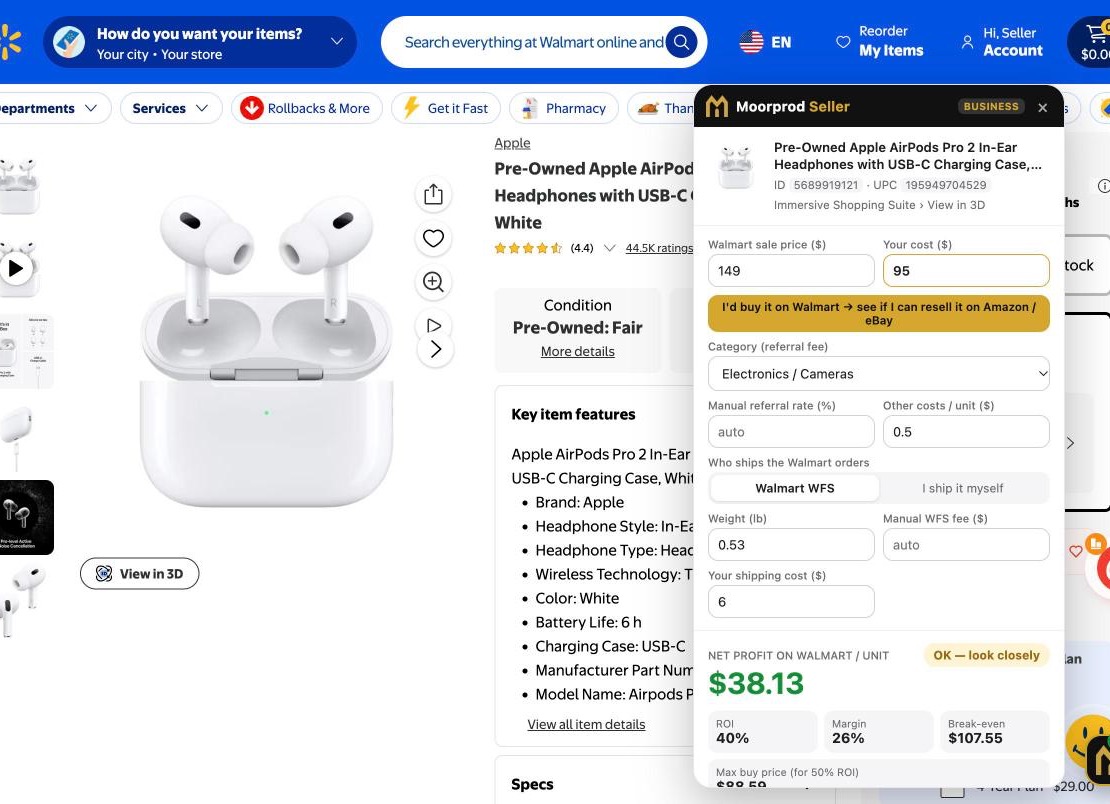
Referral and WFS fees, net profit, ROI, break-even and the most you can pay, with a clear GOOD, OK or SKIP verdict.
Walmart · Amazon · eBay
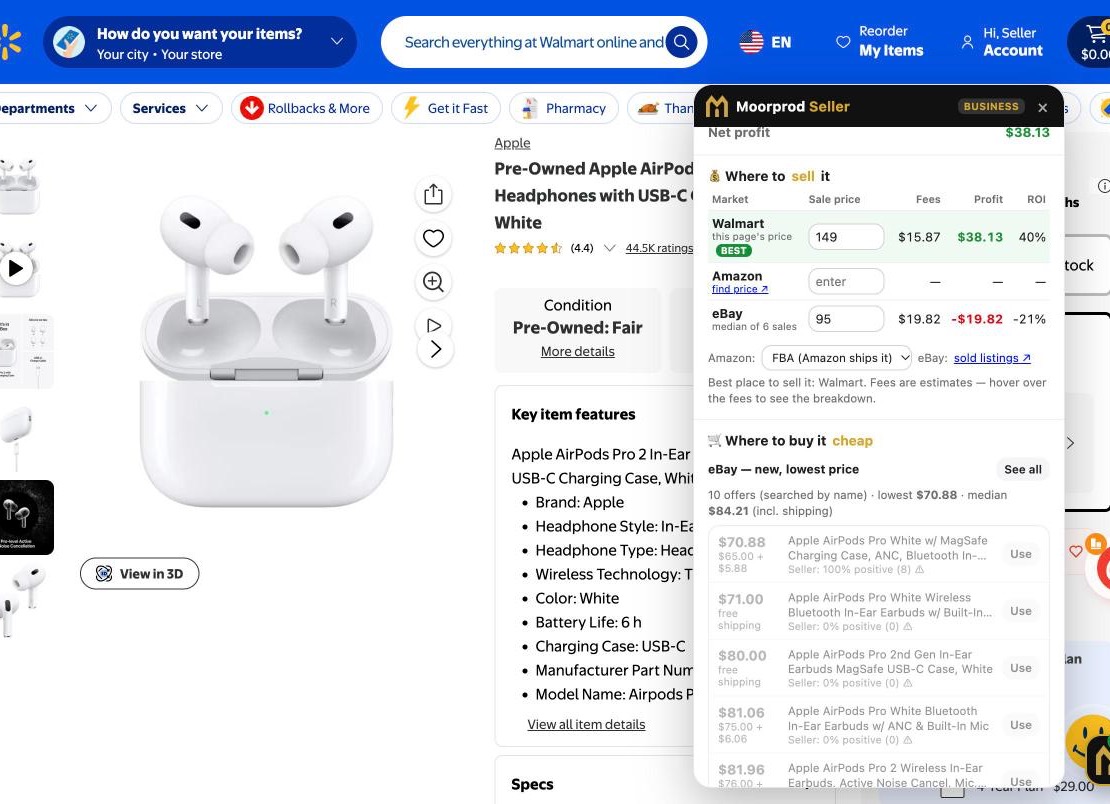
Fees, profit and ROI on all three marketplaces side by side, with eBay sold prices and offers from trusted sellers.
New · On your phone
In the store, scan a barcode with your phone camera: product, prices at other stores, lowest price ever seen, and your profit if you resell it.
Pro
Target, Best Buy, Costco, Home Depot, Lowe's, Sam's Club and more.
Pro
Track a product and get a notification when its price drops or hits your target.
Pro · Business
Paste a list or drop a CSV: every product scored in one table you can sort and export.
Pro · Business
Track what you buy and what you sell: real profit, margin, days to sell and stock value. Business adds expenses, receipt photos and a Schedule C report.
Pro
Moorprod searches Walmart for you every 2 hours and plays its sound when it finds a deal worth flipping.
Pro
ShopGoodwill, GovDeals, Public Surplus and more: your total cost and the highest bid that still pays.
Moorprod Scan · On your phone
No app to download. Open moorprod.io/scan on your phone, in the store, and scan.
Go to moorprod.io/scan (Kreyòl: moorprod.io/ht/scan). Tap "Add to your home screen" to open it like an app.
"I buy for myself" to know if the price is good. "I resell" to see your profit.
Tap "Scan a barcode", allow the camera, and put the barcode inside the frame. The phone vibrates when it reads it. You can also type the code.
Product, photo and brand, prices at other stores with their date, and the lowest and highest prices ever seen. Old prices appear in gray.
Shopper: GOOD PRICE, NORMAL PRICE or CHEAPER ELSEWHERE, and how much you save. Reseller: type the resale price to see profit, ROI, fees and the most you can pay.
Quick links open eBay sold prices, Walmart, Amazon, Target, Google, 1688 and AliExpress. You hear "ka-ching" when it's a good deal.
Product not found? Type the name written on the box: the links and the math still work. Free: 5 scans a day. Tap 🔑 and paste your MP-… key for unlimited scans with a paid plan. Prices come from public databases: always check in the store.
Lists, prices and receipts are stored in Chrome. We don't sell data or track your browsing.
Try Pro for free. Cancel anytime in the customer portal.
English, French, Spanish and Haitian Creole.
How it works
No account to connect and nothing to set up. Open a product, type what you would pay, and read the answer.
Add Moorprod Seller to Chrome, click the puzzle icon and pin the gold M so it's always one click away.
Go to any product page on walmart.com. The Moorprod panel opens on the right and reads the product for you.
Enter the price you would pay for it. Profit, ROI and the verdict update as you type.
See which marketplace pays the most and where you can buy the same product for less.
Save the deal to your list, track its price, or export everything to CSV.
Inventory · Pro and Business
You add a purchase in one click and mark it sold when it sells. Moorprod does all the math.
On the product page, type what you paid, choose the quantity in "Your inventory" and click "Add to inventory". Name, UPC, photo, other costs and where you'll sell it are filled in for you.
Click "See all inventory" in the panel, or click the gold M in Chrome, then "📦 Inventory & sales".
Connect eBay once and every eBay sale is added on its own, with the real fees. For other sales, click "I sold it" or import your Amazon, Walmart, Mercari or Poshmark report (CSV).
Sales, cost of goods sold, fees, gross profit, margin, ROI, average days to sell and stock value, by month or by year. Items in stock for more than 60 days are flagged.
Download your inventory and your sales (P&L) as CSV files. Business: see your net profit after the expenses on the Expenses page.
eBay: Moorprod only reads your orders (read-only) and can't change anything on eBay. Buyer details are never stored. Importing the same sale twice never doubles it. Your inventory stays in Chrome on your computer.
Every feature
Each part of the app, what it shows you and how to use it.
Open moorprod.io/scan on your phone and scan barcodes right in the store.
On every walmart.com product page, the panel reads the price, category, weight, UPC, seller, number of sellers, reviews and stock. You enter your cost and Moorprod does the math.
Know if a product sells and if you can beat the current listing.
One table compares Walmart, Amazon and eBay, each with its own fees.
Find the same product for less before you buy.
Not a reseller? Moorprod Seller also helps you pay less for what you buy.
See where the same product costs less at the source.
Shopping on another store? The panel opens there too.
Track a product and let Moorprod watch the price for you.
Let Moorprod hunt for deals while you do something else.
Bid smarter on ShopGoodwill, GovDeals, AllSurplus, Public Surplus, GSA Auctions, Municibid and PropertyRoom.
A "ka-ching" made for Moorprod, so you hear a good deal before you read it.
Plan a bigger buy and your advertising budget.
Analyze a whole list of products at once.
Know what you really made, not just what you hoped to make.
Keep your reseller bookkeeping in one place.
Make the math match your business.
Activate Pro or Business in seconds.
Questions
Yes. Take the Shopper plan ($4.99 a month) or choose "Shopper (I buy for myself)" in Settings. The panel then shows if a price is good, where it's cheaper (even in China) and alerts you when it drops.
Yes, with Moorprod Scan: open moorprod.io/scan on your phone, scan a barcode, and add it to your home screen. The full extension works in Google Chrome on a computer.
They are estimates based on the public fee tables of Walmart, Amazon and eBay. Always check in your seller account before you buy in quantity. You can change any rate by hand on a product.
No. Moorprod Seller works without connecting any account. It helps you decide what to buy and where to resell it.
For eBay, yes: connect your eBay seller account once and your sales are added on their own every 4 hours, with the real fees. Adding a purchase takes one click from the product panel. For Amazon, Walmart, Mercari or Poshmark, import the sales report (CSV) or click "I sold it". All the profit math is automatic.
Moorprod Seller never loads Amazon by itself. On an Amazon page, it reads the page you have open. Elsewhere, you type the Amazon price, with a link to look it up.
Current eBay offers now come from the official eBay API, so you don't need to sign in for them. eBay shows sold prices only to signed-in users: sign in to eBay in Chrome once to see real recent sales.
No. It only reads the pages you open and does the math. You stay in control of every purchase.
No. Deal Radar runs inside Chrome, about every 2 hours, while Chrome is open on your computer. You can also click "Search now" in the Deal Radar tab.
In Chrome, on your computer: lists, prices, inventory, sales, expenses and receipt photos. moorprod.io receives your license key to check your plan, the name of a store when the panel can't read its page (you can turn this off), and, only if you connect eBay, keeps your eBay connection (encrypted) to fetch your sales.
Google Chrome on a computer for the extension. Moorprod Scan works in the browser of any phone.
Yes, anytime in the customer portal. Your plan stays active until the end of the period you paid for, then the extension goes back to the free plan.
Some "where to buy" links may be affiliate links: if you buy, the store may pay Moorprod a small commission, at no extra cost to you. They are marked in the app and never change the price you pay.
App · Moorprod Seller
A Chrome extension for Walmart, Amazon and eBay resellers. In English, French, Spanish and Haitian Creole.
The profit calculator, free forever.
For people who buy for themselves, not to resell.
Everything you need to source and resell.
For resellers who scale.
Beta: download the extension from moorprod.io and install it in Chrome (steps on the Moorprod Seller page). Coming soon to the Chrome Web Store. Cancel anytime.
Free beta
Download the beta for free. Upgrade to Shopper, Pro or Business when you're ready, with a 7-day free trial.
Version 1.12.0 · Google Chrome on a computer.